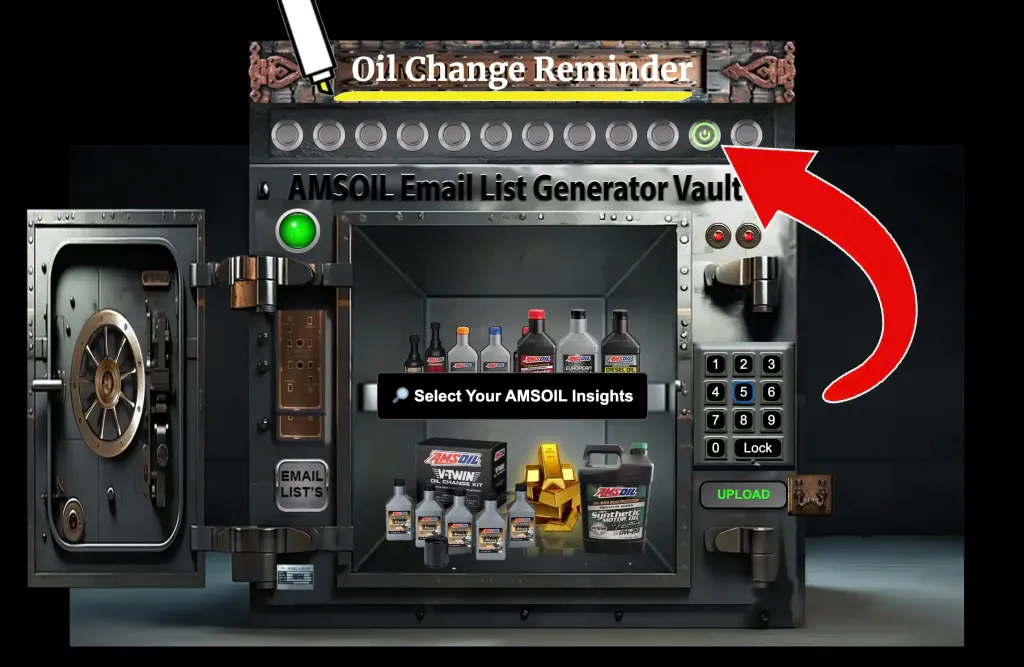
See and Use the Real Live AMSOIL Insights Vault
Register as an Authorized AMSOIL Dealer
What Is the AMSOIL Dealer Insights Vault?
The AMSOIL Dealer Insights Vault is a locked, organized “command center” that takes a standard dealership export and turns it into:
- Dashboards you can actually use
- Email-ready lists you can act on instantly
- Charts and popups that explain what’s happening
- Segments that are hard (or impossible) to get from the default CSV alone
It was built to support a downline of 6,000+ people and to organize them into 11 specialized email lists, plus extra insight tools that help you decide who to contact, what to say, and when to say it.
It’s also important to be clear about this:
This Is Not an Official AMSOIL Tool
The Vault is not offered by AMSOIL. It’s a custom solution we built for personal dealership use. If someone wants to share the concept with their own downline, they can—but it’s not an AMSOIL product, and it’s not a replacement for AMSOIL’s systems.
Why I Built It: The Problem With Raw Dealer Data
The typical dealership CSV export is full of value… but it’s not decision-friendly.
The CSV Tells You “What” But Not “What To Do Next”
Most dealer exports answer questions like:
- Who is in my list?
- What was the last activity?
- What account types exist?
But it usually does not answer questions like:
- Who is most likely to buy again soon?
- Which customers are slipping away quietly?
- Who should I contact this week for the best results?
- Who has loyalty value that should be used before it expires?
- Where is my downline concentrated—and where are the gaps?
The Vault is designed to convert “raw data” into actionable next steps.
What the Vault Does in One Sentence
It turns one downloaded report into a full set of dashboards, segments, and ready-to-use outreach lists—so you can lead your downline and serve customers faster.
How the Vault Works (Simple Workflow)
Here’s the core workflow that keeps it fast and repeatable:
Step 1: Download the CSV From AMSOIL
You download the Active Personal Customers .csv from the Dealer Zone.
Step 2: Upload It Into the Vault
You upload the file into the Vault and enter the passcode 1965.
Step 3: Let It Process
The Vault runs calculations and renders dashboards and popups. Typical load time is about 10–15 seconds.
Step 4: Use the Dashboards + Lists
You explore the dashboards and use the lists to contact the right people with the right message.
Step 5: Lock It
When you’re done, you lock the Vault to keep it secure.
The Big Win: Everything Is Built Around Action
A normal spreadsheet is passive. You open it and stare at it.
The Vault is the opposite.
The Vault Is Designed for “Do Something Now”
Most sections are built with a “do it now” workflow:
- Find the segment
- Click into details
- Copy the email block (or use the built-in email features)
- Take action
- Move to the next segment
That’s why the Vault doesn’t just sort data. It creates tools.
.
Smart Layout Choices That Make the Vault Easy to Use
A tool like this lives or dies by usability.
The Vault includes practical design decisions that matter when you’re dealing with huge lists.
It Avoids the “Infinite Scroll Spreadsheet Problem”
Instead of dumping thousands of lines into one wall of text, it breaks lists into:
- sections
- headers
- consistent formatting
- repeatable blocks
Row Handling
There’s a known detail in how it’s structured:
- Row 3 is restricted due to code.
- When copying emails, start at row 4.
That’s a small detail, but it prevents frustration and confusion when you’re doing real outreach.
What Makes the Vault Different From “Just Sorting a Spreadsheet”
Plenty of people can sort a CSV.
The Vault goes beyond sorting in a few key ways:
It Creates Segments That Aren’t Obvious
Instead of “all customers,” you get:
- customers who need action
- customers who show momentum
- customers who are at risk
- customers who have rewards value
- accounts that should be converted
It Combines Insight + Action
Many tools show charts and stop there.
The Vault shows charts and gives you the list and gives you outreach tools.
It Helps You Lead Like a Pro
When you manage a downline, you’re not just selling oil.
You’re supporting:
- motivation
- clarity
- onboarding
- retention
- consistent habits
The Vault helps you do that systematically.
How to Use the Vault Week-to-Week (A Simple Routine)
If you want the Vault to pay you back, use it on a rhythm.
Weekly Routine (30–60 Minutes)
Step 1: Check Expiring Lists
- Expiring PCs
- Expiring Dealers
Step 2: Check Top Buyers
- identify who’s active
- look for patterns
- send a quick “help” message
Step 3: Check Loyalty
- value available
- value expiring
- send reminders
Step 4: Check Convert Lists
- Convert to PCs
- Convert to Auto Renew
Monthly Routine (1–2 Hours)
- Review the 12-month forecast trend
- Look at the map and identify gap opportunities
- Send one value-packed email to each major account group
Why This Improves Results Without Feeling “Salesy”
The Vault supports a more modern approach:
Lead With Help
Most of the lists are built around “helpful reasons to reach out,” like:
- expiring status
- loyalty value
- maintenance timing
- product education
- cleaner buying patterns
When outreach is helpful, people respond better.
Security and “Vault” Behavior
Calling it a “Vault” is not just a fun name.
Why Locking Matters
When you’re dealing with big lists and dealership data:
- you want privacy
- you want control
- you want to prevent accidental exposure
So the Vault includes a “Lock” behavior that reinforces:
- intentional use
- secure sessions
- clean wrap-up
Who This Was Built For
This tool is perfect for:
Dealers with a Growing Downline
If your downline is expanding, you need a system.
Dealers Managing Multiple Account Types
Retail, PC, commercial, dealers—each group needs different messaging.
Dealers Who Want to Communicate More Consistently
Consistency beats intensity.
The Vault makes consistency easier.
Common Questions People Ask Me About the Vault
Is it hard to use?
No. The workflow is built around:
- upload CSV
- let it render
- click into dashboards
- use lists
Do I need to be a coder?
No. The point is that you don’t have to be.
Is it fast?
Yes—after upload, it typically renders in 10–15 seconds, even with large datasets.
Does it replace AMSOIL tools?
No. It’s an action layer built on top of the export.
Final Thoughts: The Vault Turns “Dealer Work” Into a System
I built the AMSOIL Dealer Insights Vault because I didn’t want to rely on memory, guesswork, or messy spreadsheets to run something serious.
It helps me:
- see what matters
- act faster
- stay consistent
- support more people without burning out
And most importantly, it makes the business feel organized—which is what lets it grow.
Dashboard 2: U.S. Downline Map (See the Business on a Map)
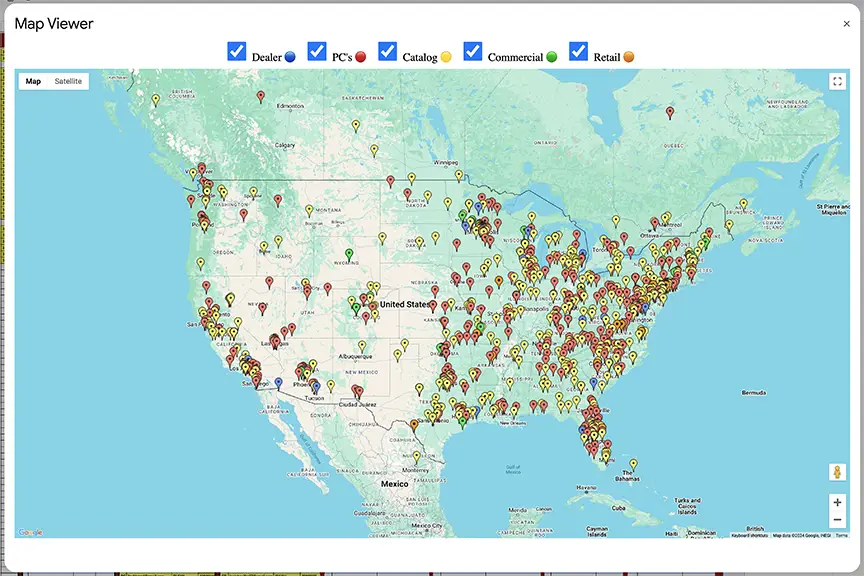
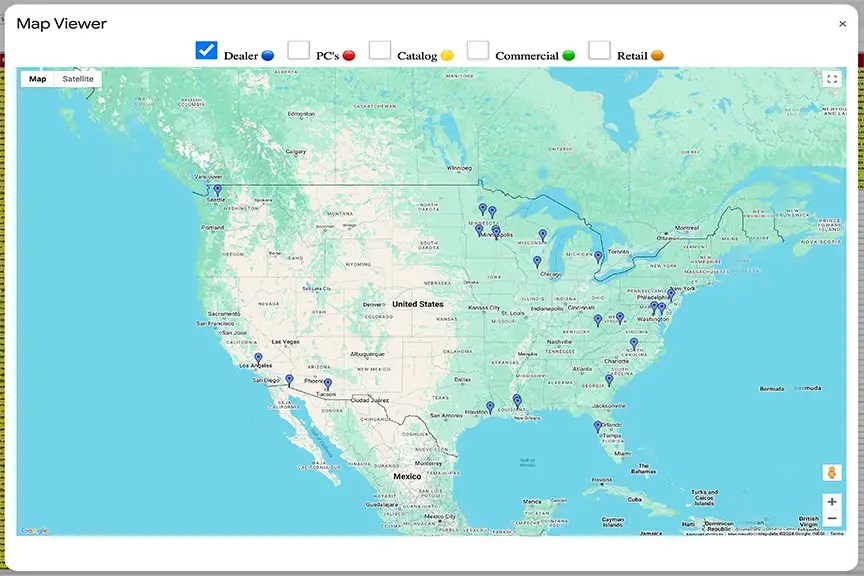
The U.S. Downline Map is exactly what it sounds like—your downline visualized geographically.
What It Does
It lets you see:
- Where your downline is clustered
- Where you have little or no coverage
- Which states or regions are “hot”
- Which areas might benefit from focused recruiting or support
Why It Matters
A list hides patterns. A map reveals them.
When you can see the business on a map, you can spot:
- Regional opportunity gaps
- Areas where events, weather, or industry might create demand
- Local “hot zones” where your downline already has traction
Extra Vault Benefits
The map includes category filtering and click-for-details behavior, so it’s not just a picture—it’s interactive
Dashboard 1: Assigned Forecast (The 12-Month Outlook)
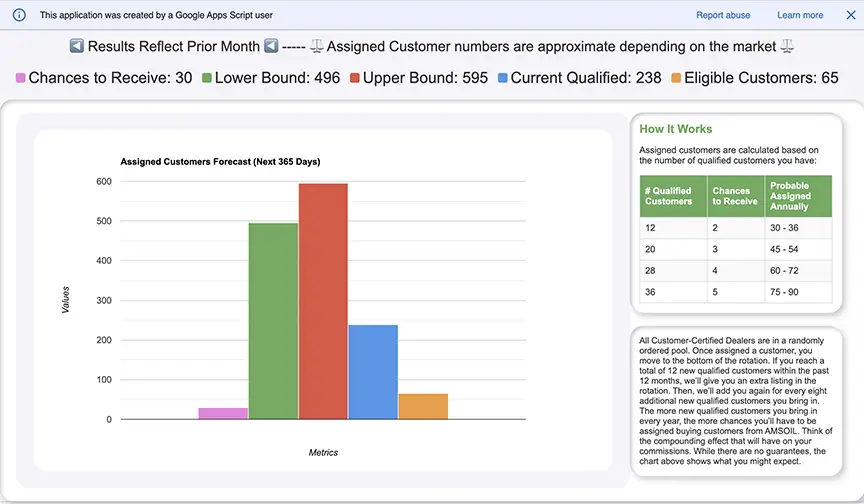
One of the most useful features is the Assigned Forecast.
What It Does
It predicts how many assigned customers a dealer can reasonably expect over the next 12 months, based on what the data shows right now.
Why It Matters
Assigned customers are a big deal because they often represent:
- New buying opportunities
- Growth momentum
- The “health” of the business flow
When you can see a 12-month expectation, you can:
- Set realistic goals
- Plan outreach campaigns
- Measure whether your growth engine is improving or stalling
How I Use It
- If the forecast is flat, I focus on improving conversion and retention.
- If the forecast is rising, I focus on scaling communication and support.
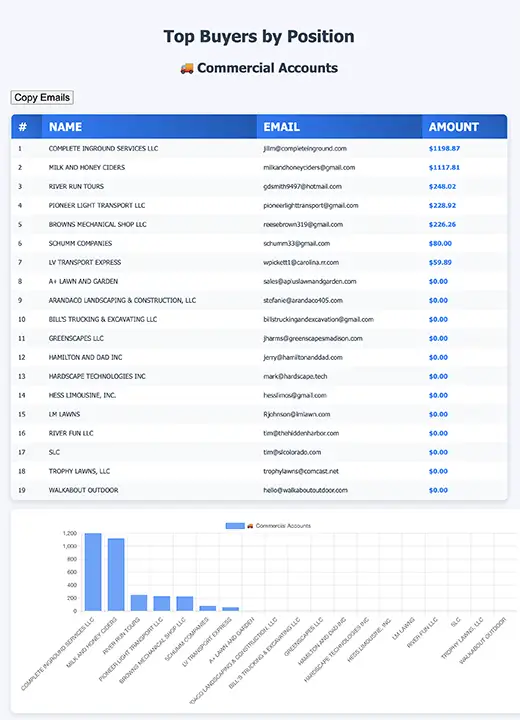
Dashboard 3: Top AMSOIL Buyers (Who’s Driving Revenue)
This is one of the most “immediately useful” sections because it tells you who is already raising their hand.
What It Does
It produces:
- A Top 20 buyers view (across categories)
- Visual charts that show the distribution
- Tables that let you act quickly
- Email tools so you can contact them fast
Why It Matters
Top buyers are not just customers—they’re signals.
They can become:
- Referral sources
- Case studies and testimonials
- “Power users” who influence others
- Future Preferred Customers or long-term loyalists
- Potential dealers (in the right situation)
How I Use It
- I treat top buyers like VIPs.
- I check whether they’re in auto-ship/auto-renew patterns.
- I send quick “helpful” emails instead of sales emails.
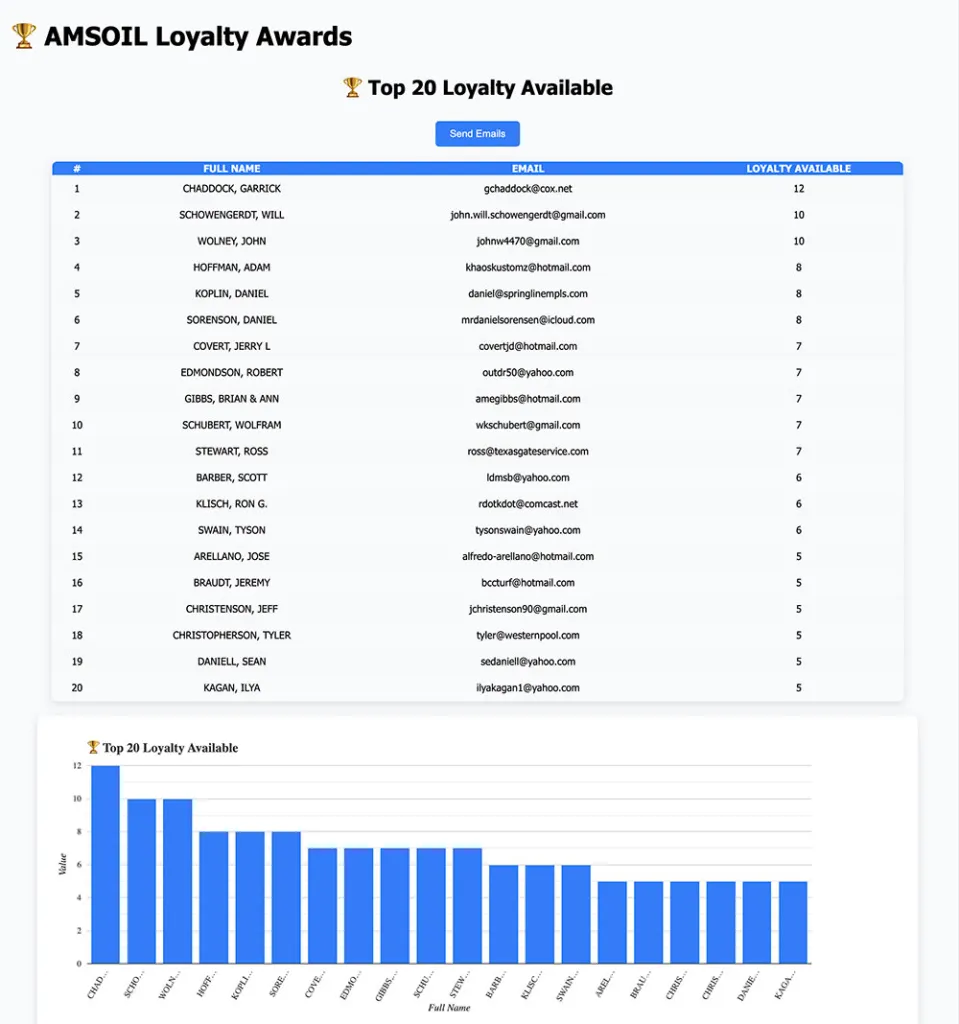
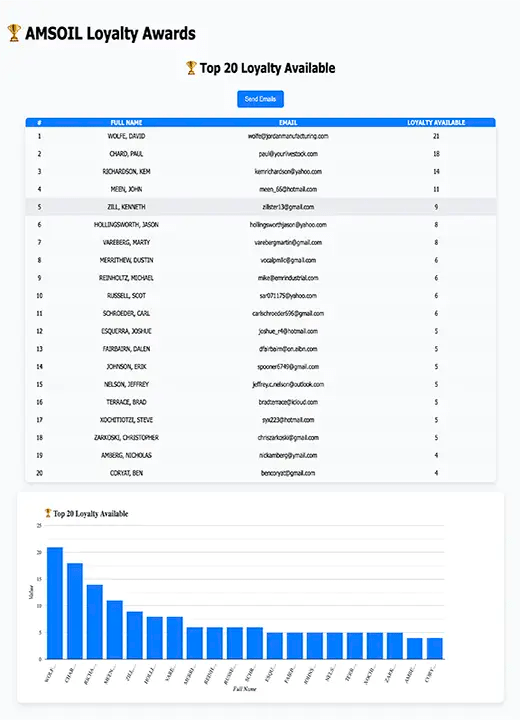
Dashboard 4: Loyalty Awards (Turn Loyalty Into Action)
This is a critical feature because loyalty is often invisible unless you look for it.
What It Does
The Vault identifies customers with loyalty value (available, expiring, pending, or spent—depending on what you’re tracking) and makes it easy to act.
Why It Matters
Loyalty value is one of the easiest “win-win” conversations you can have.
Customers like hearing:
- “You have value available.”
- “You have value expiring.”
- “Here’s how to use it.”
It increases:
- Trust
- Purchase confidence
- Repeat orders
- Program engagement
Built-In Outreach
The Vault includes automated email functions in the relevant lists, so you can notify customers quickly.
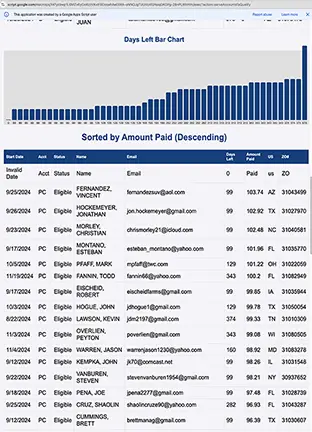


 AMSOIL Insights Vault